


With a wide range of products, numerous SKUs, multiple branches, and constantly changing customer behavior, businesses need a cloud POS system for beauty stores that can manage sales, inventory, customers, and branches from one platform.
A cloud POS system gives beauty store owners greater visibility into daily operations, helping them track sales, identify best-selling products, monitor inventory, manage purchasing, and analyze branch performance. It can also create a faster and more organized checkout experience for both employees and customers.
What Is a Cloud POS System for Beauty Stores?
A cloud POS system is software designed to manage sales, payments, invoices, and inventory through an online platform. Instead of relying on a single device or a local server inside the store, business data is stored securely in the cloud and can be accessed based on the system's permissions and configuration. For beauty stores, a POS system is not limited to processing sales. It can become part of an integrated business management solution that includes:
• POS and cashier operations.
• Inventory management.
• Purchasing management.
• Product and price management.
• Branch and warehouse management.
• Sales reporting.
• Customer management and loyalty programs.
• Employee performance tracking.
• Financial reporting.
• Order management and multiple sales channels.
With this approach, business owners can access operational data and monitor performance from different locations instead of relying on manual records or disconnected systems.
Why Do Beauty Stores Need a Specialized POS System?
Beauty stores have different operational requirements compared with many other retail businesses. A store may carry hundreds or thousands of products, including skincare products, hair care products, perfumes, makeup, accessories, and other personal care items.
Products may also vary by brand, size, color, shade, type, and price. As the number of products and branches grows, managing operations manually becomes increasingly difficult.
An integrated POS system connects sales directly with inventory. When a product is sold through the cashier, the inventory quantity can be updated in the system. This gives management better visibility into available stock and helps reduce errors caused by manual data entry.
Managing Sales Through a POS System
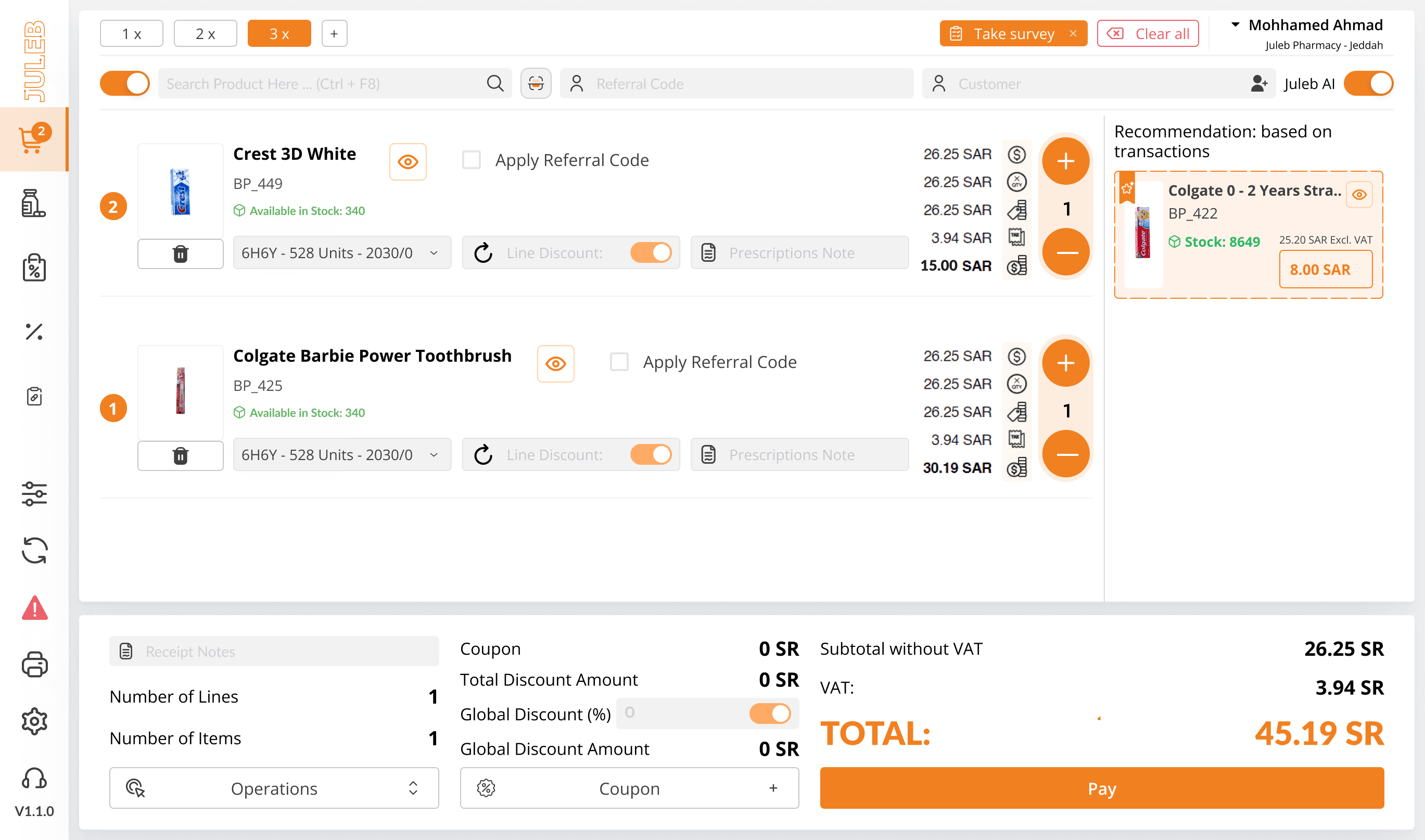
Sales are among the most important daily operations for a beauty store, so the checkout process needs to be fast and easy for both employees and customers. A cloud POS system can help businesses:
• Process sales quickly.
• Issue invoices and receipts.
• Manage different payment methods.
• Apply discounts and promotions.
• Process returns.
• Identify best-selling products.
• Analyze sales by period, branch, or product.
• Monitor employee performance.
• Connect sales with inventory.
Through sales reports, store owners can identify which products generate the most sales and which products may require changes in pricing, promotions, or purchasing strategies.
Inventory Management for Beauty Stores
Inventory management is one of the biggest challenges for beauty stores, especially businesses with a large number of products and multiple branches. Inaccurate inventory records can lead to problems such as stockouts, excess stock, slow-moving products, or differences between actual inventory and quantities recorded in the system.
An inventory management system integrated with the POS can help businesses monitor product movement continuously, from receiving products to selling them. The system can help businesses:
• Monitor available quantities.
• Track product movement.
• Conduct inventory counts.
• Identify fast- and slow-moving products.
• Determine which products need to be reordered.
• Monitor inventory across branches and warehouses.
• Transfer products between branches and warehouses.
• Reduce manual stock-counting errors.
This creates a more organized inventory management process and provides businesses with better data for purchasing and replenishment decisions.
Purchasing and Reordering Management
Managing a beauty store does not start and end with sales. It also involves selecting products, purchasing the right quantities, and making sure products are available when customers need them.
By connecting sales, inventory, and purchasing data, management can gain a clearer view of which products need to be replenished.
For example, if the inventory of a specific product continuously decreases because of high demand, sales and inventory data can help determine when to reorder and how much stock may be needed.
This can help reduce the risk of running out of high-demand products while avoiding unnecessary purchases of excessive quantities.
Managing Beauty Store Branches From One Platform
As a beauty brand expands and opens additional branches, managing operations through separate systems can become increasingly complicated. A cloud POS system can connect multiple branches through a centralized platform, allowing management to monitor sales, inventory, and operations from one place. Branch performance can be analyzed using indicators such as:
• Total sales.
• Number of transactions.
• Average transaction value.
• Best-selling products.
• Employee performance.
• Inventory movement.
• Sales by time period.
This centralized visibility helps management understand the performance of each branch and make decisions based on actual business data.
Online and Offline POS Operations
One of the practical requirements for retail businesses is having a POS system that can continue supporting sales when there is an internet connectivity issue. A temporary internet outage should not necessarily bring store operations to a complete stop.
A cloud POS system that supports online and offline operations can provide greater flexibility for cashiers, with data synchronization when connectivity is restored, depending on the system's capabilities and configuration.
This can be particularly valuable for stores that rely on POS operations continuously throughout business hours.
Improving the Customer Experience
A POS system is not only about internal operations. It can also contribute to a better customer experience.
When customer information is connected with sales data, businesses can gain better visibility into previous purchases and customer behavior, based on the data collected by the system and applicable requirements.
A POS system can also be integrated with loyalty programs and promotions, helping businesses build ongoing relationships with customers rather than focusing only on individual transactions.
For example, loyalty programs can be used to reward customers for purchases or provide offers according to the store's policies and available customer data.
Reporting and Analytics for Beauty Stores
Data is one of the most valuable assets for a beauty store. Instead of relying only on assumptions, businesses can use POS reports to understand their operational and sales performance. Useful reports can include:
• Daily and monthly sales reports.
• Sales by branch.
• Sales by product.
• Best-selling products.
• Slow-moving products.
• Inventory reports.
• Purchasing reports.
• Employee reports.
• Customer reports.
• Profit and financial performance reports.
These reports can help answer important questions: Which products are in the highest demand? Which branch generates the most sales? Which products need to be reordered? During which periods does demand increase?
Connecting POS With Accounting
Using a POS system separately from accounting software can result in duplicate data entry and increase the possibility of errors.
For this reason, businesses can benefit from having a POS system as part of an integrated platform that connects sales with accounting, inventory, and purchasing. When these operations are integrated, sales, invoices, and financial transaction data can flow into the appropriate system, providing a more complete view of the store's financial and operational performance.
This is particularly important for businesses with multiple branches that need to manage their operations from a centralized platform.
How to Choose a Cloud POS System for a Beauty Store in Saudi Arabia
Before choosing a POS system, businesses should identify their current and future operational requirements. Some of the key factors to consider include:
1. Ease of Use
The system should be simple and intuitive for cashiers, employees, and management.
2. Inventory Management
Make sure the system can manage products, quantities, inventory counts, and stock movement between branches and warehouses.
3. Multi-Branch Support
If your business operates multiple branches, the system should provide centralized branch management and allow you to monitor the performance of each location.
4. Reporting
Choose a system that provides clear reports covering sales, inventory, customers, and financial performance.
5. Cloud-Based Access
A cloud-based system allows authorized users to access business data from different locations without relying on a single device.
6. Online and Offline Operations
This capability can give stores greater flexibility to continue processing sales when internet connectivity is temporarily unavailable.
7. Integrations
Integration with accounting, payment solutions, e-commerce platforms, and other business systems can reduce manual data entry and improve operational efficiency.
Juleb: Cloud POS System for Beauty Stores
Juleb provides an integrated platform for managing sales, inventory, purchasing, branches, and accounting from one system. Through its POS solution, beauty stores can manage cashier and sales operations while connecting sales activity with inventory and other business processes. Juleb also supports inventory, branch, and warehouse management, product movement tracking, and reporting to help business owners and management understand performance and make data-driven decisions. The solution is part of a cloud ERP platform designed to support multiple industries, including retail, beauty, pharmacies, healthcare, and distribution.
Conclusion
A cloud POS system for beauty stores in Saudi Arabia has become an important part of the technology infrastructure for businesses looking to organize their operations and support growth.
Instead of relying on separate systems for sales, inventory, purchasing, accounting, and branch management, an integrated solution can connect these operations through one platform.
From cashier and sales management to inventory counting, warehouse management, purchasing, branch operations, and reporting, the right POS system can provide greater visibility into daily business activities.
If you manage a beauty store or a multi-branch beauty business and are looking for a more organized way to manage sales, inventory, and operations, an integrated cloud solution can help create a more centralized and scalable approach to business management.
Book a free demo with Juleb and discover how you can manage sales, inventory, and branches from one platform.